Opentelemetry Java agent extension - 카멜 헤더 파서
개요
CamelHeaderInstrumentationModule은 OpenTelemetry Java Agent 확장 기능을 활용하여 Apache Camel Processor가 실행될 때 Camel Exchange의 In 메시지 헤더를 자동으로 수집해 Span Attribute로 기록하는 모듈입니다.
이를 통해 Camel 기반 애플리케이션의 Processor 로직을 수정하지 않고도 헤더 기반 추적·디버깅 정보를 모니터링 화면에서 직접 확인할 수 있게 만드는 목적을 가지고 있습니다.
코드
package org.example.otel.camel;

import io.opentelemetry.api.trace.Span;
import io.opentelemetry.javaagent.extension.instrumentation.InstrumentationModule;
import io.opentelemetry.javaagent.extension.instrumentation.TypeInstrumentation;
import io.opentelemetry.javaagent.extension.instrumentation.TypeTransformer;
import net.bytebuddy.asm.Advice;
import net.bytebuddy.description.type.TypeDescription;
import net.bytebuddy.matcher.ElementMatcher;
import net.bytebuddy.matcher.ElementMatchers;
import org.apache.camel.Exchange;
import java.util.Collections;
import java.util.List;
import java.util.Map;
import static net.bytebuddy.matcher.ElementMatchers.*;

/**
 * CamelHeaderInstrumentationModule는 Apache Camel의 모든 Processor 구현체의 process(Exchange)
 * 메서드를 인터셉트하여, Camel In 메시지의 헤더 중 "Camel"으로 시작하는 항목들을 현재 활성 스팬의 속성(attribute)으로 추가합니다.
 *
 * 이 모듈은 기존의 Camel instrumentation과 독립적으로 동작하며, -Dotel.javaagent.extensions 옵션을 통해 agent에 등록됩니다.
 */
public class CamelHeaderInstrumentationModule extends InstrumentationModule {

  public CamelHeaderInstrumentationModule() {
    super("camel-header", "camel-header-extraction");
  }

  @Override
  public List<TypeInstrumentation> typeInstrumentations() {
    // Processor 인터페이스를 구현한 모든 클래스가 대상입니다.
    return Collections.singletonList(new CamelProcessorInstrumentation());
  }

  /**
   * CamelProcessorInstrumentation은 org.apache.camel.Processor를 구현한 모든 클래스의
   * process(Exchange) 메서드를 타겟으로 Advice를 적용합니다.
   */
  public static class CamelProcessorInstrumentation implements TypeInstrumentation {

    @Override
    public ElementMatcher<TypeDescription> typeMatcher() {
      // org.apache.camel.Processor 인터페이스를 구현하는 클래스 대상
      return ElementMatchers.hasSuperType(named("org.apache.camel.Processor"));
    }

    @Override
    public void transform(TypeTransformer transformer) {
      transformer.applyAdviceToMethod(
          named("process")
              .and(takesArguments(1))
              .and(takesArgument(0, named("org.apache.camel.Exchange"))),
          CamelHeaderInstrumentationModule.class.getName() + "$ProcessAdvice"
      );
    }
  }

  /**
   * ProcessAdvice는 process(Exchange) 메서드 호출 시점에 Camel In 메시지의 헤더를 추출하여,
   * 키가 "Camel"으로 시작하는 항목들을 현재 활성 스팬에 "camel.header.<header>" 형태로 추가합니다.
   * 실제 로직은 Exchange 객체만 보고 Span API를 호출하므로 비즈니스 코드엔 영향을 주지 않습니다.
   */
  public static class ProcessAdvice {

    @Advice.OnMethodEnter(suppress = Throwable.class)
    public static void onEnter(@Advice.Argument(0) Exchange exchange) {
      String contextName = exchange.getContext().getName();
      // Camel Exchange의 In 메시지에서 헤더 추출
      Map<String, Object> headers = exchange.getIn().getHeaders();
      if (headers == null || headers.isEmpty()) {
        return;
      }
      // 전체 헤더 정보를 문자열로 변환하여 "camel.headers"에 저장
      String camelHeaders = headers.toString();
      // 현재 활성 스팬을 가져옴
      Span currentSpan = Span.current();
      if (currentSpan != null && currentSpan.getSpanContext().isValid()) {
        // 전체 헤더 문자열을 우선적으로 저장
        // currentSpan.setAttribute("camel.headers", camelHeaders);
        System.out.print("Added Camel headers as span attribute: " + camelHeaders);
        currentSpan.setAttribute("camel.context.name", contextName);

        // 이후, 전체 헤더에서 개별 항목들을 파싱하여 "camel.headers.<key>" 형태로 추가
        for (Map.Entry<String, Object> entry : headers.entrySet()) {
          String headerKey = entry.getKey();
          Object headerValue = entry.getValue();
          String attributeKey = headerKey;
          String attributeValue = headerValue != null ? headerValue.toString() : "null";
          currentSpan.setAttribute(attributeKey, attributeValue);
          System.out.print("Added Camel header attribute: " + attributeKey + " = " + attributeValue);
        }
      }
    }
  }
}
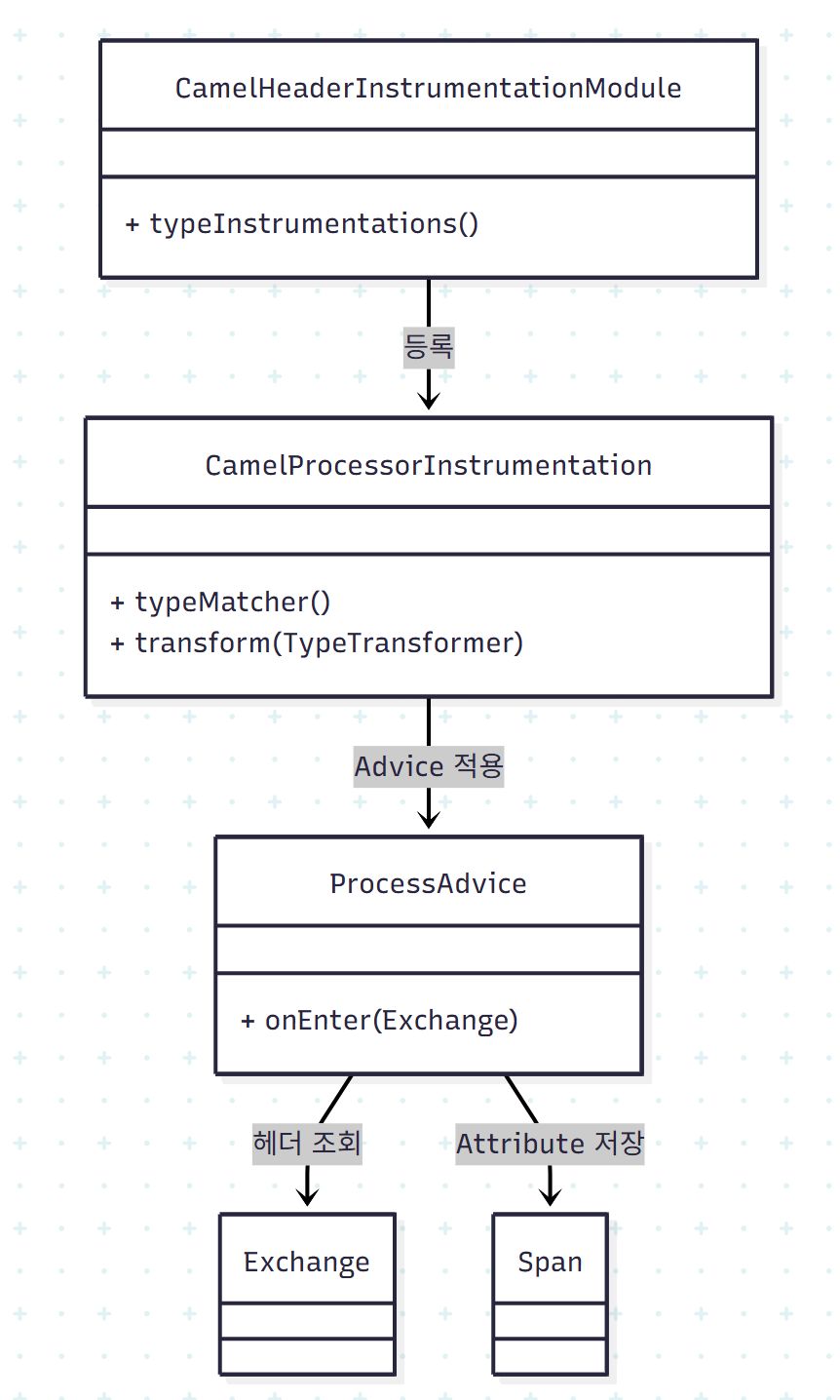
클래스 다이어그램
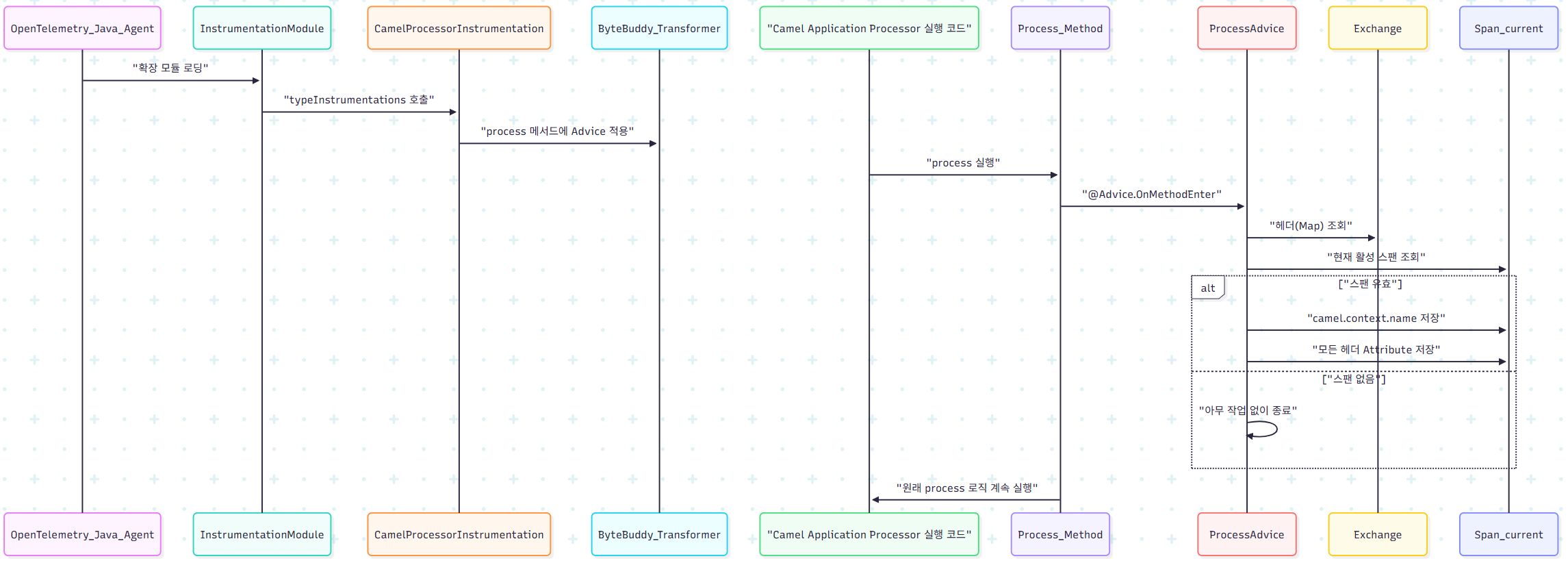
시퀀스 다이어그램
동작 구조
이 모듈은 OpenTelemetry Java Agent가 제공하는 InstrumentationModule을 상속받아 구현되어 있으며, -Dotel.javaagent.extensions 옵션을 통해 agent에 로딩되는 구조입니다.
Camel Processor의 핵심 메서드인 process(Exchange) 호출 시점에 Advice를 적용하여 Exchange 헤더를 읽어 스팬 속성(Attribute)으로 추가하는 방식으로 동작합니다.
적용 대상
org.apache.camel.Processor 인터페이스를 구현한 모든 클래스가 대상입니다.
따라서 라우팅, 인터셉터, 커스텀 Processor 등 Camel 기반의 모든 처리 흐름에 자동 적용됩니다.
Advice가 적용되는 실제 메서드는 다음 조건을 만족합니다.
| 조건 | 내용 |
|---|---|
| 메서드 이름 | process |
| 파라미터 개수 | 1 |
| 파라미터 타입 | org.apache.camel.Exchange |
주요 동작 내용
Advice 실행 시 아래 순서로 동작합니다.
Camel Context 이름 저장
camel.context.name = <ContextName>Exchange In 메시지의 헤더 전체 조회
exchange.getIn().getHeaders()를 기반으로 헤더 Map을 가져옵니다.모든 헤더를 Span Attribute로 저장
<HeaderKey> = <HeaderValue>예:
CorrelationId = d8f2fbc1
CamelHttpUri = /api/orders
UserId = 10294
현재 활성 스팬이 없는 경우에는 동작하지 않으며, 비즈니스 로직에는 영향을 주지 않도록 suppress = Throwable 옵션으로 예외를 억제합니다.
기대 효과
| 항목 | 효과 |
|---|---|
| 헤더 기반 트레이싱 | 전처리/라우팅/ESB 연동 단계에서 요청 흐름을 세밀하게 파악할 수 있습니다 |
| 디버깅 | 모니터링 화면에서 특정 헤더의 변화를 시각적으로 추적할 수 있습니다 |
| 코드 수정 필요 없음 | 기존 Camel Processor 코드 수정 없이 적용할 수 있습니다 |
| 장애 분석 | 문제 발생 시 스팬에 기록된 Camel 헤더 정보를 활용해 원인 진단 속도를 높일 수 있습니다 |
성능 및 안전성 고려 사항
- 헤더 순회 및 Span Attribute 기록 정도의 작업으로 구성되어 있어 성능 부담이 크지 않습니다.
- 애플리케이션 흐름에 영향을 주지 않도록 예외는 전부 억제하여 처리됩니다.
- 보안 및 개인정보 보존이 필요한 경우 특정 헤더에 대한 마스킹 또는 필터링 처리를 코드상에서 할 수 있습니다.