JMX Metric 수집 방법
목차
JMX Metric 수집 방법
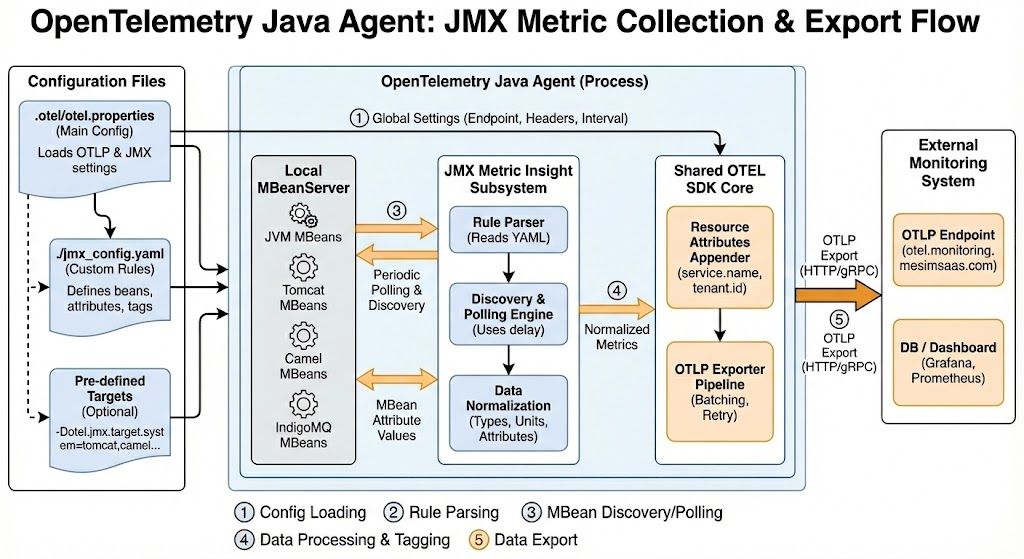
구성 맥락
.otel/otel.properties의otel.jmx.config=./jmx_config.yaml은 OpenTelemetry Java Agent(JMX Metric Insight 서브시스템)가 읽어야 할 규칙 파일을 지정합니다. 상대 경로는otel.properties위치를 기준으로 해석되므로 실제 파일은/home/ryankimjh/monitoring/.otel/jmx_config.yaml입니다.- 동일한 Java Agent 내부 SDK가 JMX·Auto-Instrumentation 메트릭을 모두 처리하므로
otel.metric.export.interval,otel.metrics.exporter,otel.exporter.otlp.endpoint,otel.exporter.otlp.headers등 일반 설정이 그대로 적용됩니다. 즉 JMX 메트릭도http://otel.monitoring.mesimsaas.com로 전송되며, 리소스/서비스 속성(otel.service.name=API_GATEWAY_AGENT,tenant.id등)과 instrumentation scopeio.opentelemetry.jmx를 공유합니다. otel.jmx.discovery.delay(미설정 시 기본값 동작)는 첫 번째 MBean 탐색 이후 다음 탐색 사이 대기 시간을 밀리초 단위로 조정하여 동적 MBean 등록에도 지속적으로 대응합니다.
JMX Metric 동작 개요
- Java Agent가 기동되면
.otel/otel.properties를 읽어 OTLP/리소스/로그/트레이스 설정과 함께 JMX 설정을 읽어옵니다. otel.jmx.config에 지정된 하나 이상의 YAML 파일을 순서대로 파싱해rules블록을 빌드합니다.- 각 규칙은 MBean ObjectName 패턴(
bean또는beans)과 속성(mapping)을 정의하며, Agent는 로컬 MBeanServer에 주기적으로 접근해 지정된 속성 값을 폴링합니다.- MBean 은 Monitoring Bean 의 약자입니다.
- 값은
metric,type(counter|updowncounter|gauge),unit,metricAttribute(태그) 정의에 따라 정규화되며, 필요 시prefix,sourceUnit,dropNegativeValues등이 반영됩니다. - 정규화된 메트릭이 내부 SDK를 통해 OTLP export 파이프라인으로 전달되어 Grafana 등에서 타 계측 지표와 함께 조회됩니다.
미리 정의된 타깃 (otel.jmx.target.system)
- OpenTelemetry는
indigomq,camel,jetty,kafka-broker,tomcat,wildfly,hadoop,jvm등 자주 쓰이는 런타임/프레임워크에 대한 사전 구성 번들을 제공합니다. - Java Agent 실행 시
-Dotel.jmx.target.system=jetty,kafka-broker형태로 지정하면 해당 타깃의 표준 YAML 규칙이 자동 로드됩니다. 현재 환경은 커스텀jmx_config.yaml만 사용하지만, 필요 시 타깃 번들과 병행하거나 참고할 수 있습니다. - 타깃이 지정되지 않으면 기본값은 없음(수집 비활성화)입니다. JMX Metric Insight는 항상 에이전트 내부에서 실행되며, OTLP 리소스 정보는 다른 계측과 동일합니다.
JMX 수집 규칙 파일(jmx_config.yaml) 작성 가이드
규칙 기본 문법
rules:
  - bean: <ObjectName 또는 패턴>
    metricAttribute:
      <key>: param(<ObjectName-파라미터>)
      <key>: beanattr(<MBean-속성>)
      <key>: const(<고정값>)
    prefix: <metric prefix>
    unit: <기본 단위>
    type: <기본 계측기 유형>
    dropNegativeValues: <true|false>
    mapping:
      <MBeanAttribute>:
        metric: <metric name>
        type: <override type>
        unit: <override unit>
        desc: <설명>
        sourceUnit: <원 단위>
        dropNegativeValues: <true|false>
        metricAttribute:
<key>: const(...)beans배열을 사용하면 서로 다른 ObjectName 여러 개를 하나의 rule에 묶을 수 있습니다.prefix와mapping의 metric 생략은prefix + attribute조합으로 자동 생성됩니다.
복합 타입 & 다중 속성
HeapMemoryUsage.used처럼attribute.field구문으로 CompositeType 내부 필드를 지칭합니다.- 동일 메트릭 이름에 서로 다른 attribute를 매핑해 방향성(
direction: in/out) 등 추가 태그만 바꿀 수도 있습니다. 단, 동일 메트릭을 재사용할 때type,unit,desc는 완전히 일치해야 합니다.
메트릭 속성(Attributes)
metricAttribute는 rule 단위 기본 태그와 metric 단위 추가 태그를 모두 허용합니다.param(name)은 ObjectName 파라미터(name=, context= 등)를 사용해 동적 태그를 생성합니다.beanattr(Type)는 MBean의 다른 속성 값을 태그로 노출합니다.const(sent)는 고정 문자열 태그를 지정할 때 사용합니다.
고급 기능
- State Metric: 문자열 상태를 계량화할 때
type: state를 사용하고, 상태 매핑(tomcat.connector.state: { ok: STARTED, failed: [STOPPED,FAILED], degraded: '*' })을 정의하면 상태별 updowncounter(0/1)가 자동 생성됩니다. - 속성 변환: 현재는
lowercase(...)변환만 지원하며, 예를 들어jvm.memory.type태그를 HEAP/NON_HEAP → heap/non_heap으로 정규화할 수 있습니다. - 단위 변환:
sourceUnit과unit을 동시에 지정하면 ms→s, ns→s 등 자동 변환이 적용됩니다. 변환이 불가하면 에이전트가 에러 로그를 남깁니다. - 음수 필터링:
dropNegativeValues: true를 rule/metric 수준에서 설정하여, JVM이 “지원 안 함”을 의미하기 위해 반환하는 음수 값을 무시할 수 있습니다. - 집계(Aggregation): 동일 rule 안에서 특정 ObjectName 파라미터를 metricAttribute로 매핑하지 않으면 자동 합산(counter/updowncounter)이나 최근값(gauge) 집계가 수행됩니다. 여러 인스턴스를 하나의 총합 지표로 보고 싶을 때 활용합니다.
- 탐색 주기:
otel.jmx.discovery.delay로 첫 탐색 이후 대기 시간을 제어합니다. MBean 탐색은 영속적으로 반복되며, Agent가 필요에 따라 주기를 동적으로 늘려 과부하를 방지합니다.
운영/활용 팁
- 규칙 확장:
/home/ryankimjh/monitoring/.otel/jmx_config.yaml에 새로운bean블록을 추가하거나 다른 YAML을 작성해otel.jmx.config=file1.yaml,file2.yaml처럼 다중 지정할 수 있습니다. - 사전 구성 재활용: 위에서 언급한
otel.jmx.target.system으로 프레임워크별 번들을 활성화하고, 현재 커스텀 규칙과 병합해 사용할 수 있습니다. - 검증 절차:
- Agent 기동 로그에서
io.opentelemetry.jmx관련 메시지를 확인해 YAML 파싱 오류가 없는지 점검합니다. - OTEL Collector 혹은 Grafana/Prometheus에서
camel.*,http.server.tomcat.*,indigomq.*메트릭이 들어오는지 쿼리합니다.
- Agent 기동 로그에서
- 성능 고려: 광범위한 ObjectName 패턴은 MBean 트리 탐색 비용을 높입니다. 필요 없는 규칙은 주석 처리하거나 별도 YAML로 분리해 상황별로 로딩합니다.
- 재배포: YAML 수정 후에는 Java 프로세스/Agent 재기동 시에만 반영됩니다. CI/CD 관점에서는 YAML 버전 관리를 통해 환경마다 일관된 수집 구성을 유지합니다.
참고 실행 예시
java -javaagent:./opentelemetry-javaagent.jar \
     -Dotel.jmx.config=./jmx_config.yaml \
     -Dotel.exporter.otlp.endpoint=http://<IP>:<PORT> \
     -jar myapp.jar
필요 시 -Dotel.jmx.target.system=tomcat,camel 또는 -Dotel.jmx.discovery.delay=2000 등을 추가해 사전 정의 메트릭과 탐색 주기를 세밀하게 제어할 수 있습니다.
설정 파일 예시
rules:
  - bean: java.lang:type=Threading
    metricAttribute:
    mapping:
      CurrentThreadCpuTime:
        metric: meta.jvm.thread.cpu.time
        type: updowncounter
        desc: The current total CPU time for all live threads in nanoseconds
        unit: "ns"
  - bean: java.lang:type=Runtime
    metricAttribute:
    mapping:
      Uptime:
        metric: meta.jvm.uptime
        type: updowncounter
        desc: The uptime of the Java virtual machine in milliseconds
        unit: "ms"
      StartTime:
        metric: meta.jvm.start.time
        type: updowncounter
        desc: The start time of the Java virtual machine in milliseconds
        unit: "ms"
  # CAMEL JMX METRICS
  # Context Level Metrics
  - bean: org.apache.camel:context=*,type=context,name=*
    prefix: camel.context.
    metricAttribute:
      context: param(context)
      route: beanattr(RouteId)
      camel_version: beanattr(CamelVersion)
      camel_class_resolver: beanattr(PackageScanClassResolver)
    mapping:
      StartedRoutes:
        metric: route.started
        type: updowncounter
        unit: "{route}"
        desc: Indicates the number of routes started successfully since context start-up or the last reset operation.
      TotalRoutes:
        metric: route.added
        type: counter
        unit: "{route}"
        desc: Indicates the total number of routes added successfully since context start-up or the last reset operation.
      ExchangesCompleted:
        metric: exchange.completed
        type: counter
        unit: "{exchange}"
        desc: Indicates the total number of exchanges processed successfully since context start-up or the last reset operation.
  - bean: org.apache.camel:context=*,type=routes,name=*
    prefix: camel.route.
    metricAttribute:
      route: beanattr(RouteId)
      context: param(context)
    mapping:
      ExchangesCompleted:
        metric: exchange.completed
        type: counter
        unit: "{exchange}"
        desc: Indicates the total number of exchanges the route has processed successfully since route start-up or the last reset operation.
      ExchangesFailed:
        metric: exchange.failed
        type: counter
        unit: "{exchange}"
        desc: Indicates the total number of exchanges that the route has failed to process since route start-up or the last reset operation.
      ExchangesInflight:
        metric: exchange.inflight
        type: updowncounter
        unit: "{exchange}"
        desc: Indicates the number of exchanges currently transiting the route.
  - bean: org.apache.camel:context=*,type=processors,name=*
    prefix: camel.processor.
    metricAttribute:
      processor: beanattr(ProcessorId)
      route: beanattr(RouteId)
      context: param(context)
      destination: beanattr(Destination)
    mapping:
      ExchangesCompleted:
        metric: exchange.completed
        type: counter
        unit: "{exchange}"
        desc: Indicates the total number of exchanges the selected processor has processed successfully since processor start-up or the last reset operation.
      ExchangesFailed:
        metric: exchange.failed
        type: counter
        unit: "{exchange}"
        desc: Indicates the total number of exchanges that the selected processor has failed to process since processor start-up or the last reset operation.
      ExchangesInflight:
        metric: exchange.inflight
        type: updowncounter
        unit: "{exchange}"
        desc: Indicates the number of exchanges currently transiting the processor.
 # Thread Pools
  - bean: org.apache.camel:context=*,type=threadpools,name=*
    prefix: camel.threadpool.
    metricAttribute:
      route: beanattr(RouteId)
      context: param(context)
      pool_id: beanattr(Id)
    mapping:
      ActiveCount:
        metric: active
        type: updowncounter
        unit: "{thread}"
        desc: The approximate number of threads that are actively executing tasks.
      CompletedTaskCount:
        metric: task.completed
        type: counter
        unit: "{task}"
        desc: The approximate total number of tasks that have completed execution. Because the states of tasks and threads may change dynamically during computation, the returned value is only an approximation, but one that does not ever decrease across successive calls.
      PoolSize:
        metric: pool.size
        type: updowncounter
        unit: "{thread}"
        desc: The current number of threads in the pool.

  # TOMCAT JMX METRICS
  - beans:
    - Catalina:type=GlobalRequestProcessor,name=*
    - Tomcat:type=GlobalRequestProcessor,name=*
    unit: "1"
    prefix: http.server.tomcat.
    metricAttribute:
      name: param(name)
    mapping:
      errorCount:
        metric: errorCount
        type: gauge
        desc: The number of errors per second on all request processors
      requestCount:
        metric: requestCount
        type: gauge
        desc: The number of requests per second across all request processors
      maxTime:
        metric: maxTime
        type: gauge
        unit: ms
        desc: The longest request processing time

  - beans:
    - Catalina:type=Manager,host=localhost,context=*
    - Tomcat:type=Manager,host=localhost,context=*
    unit: "1"
    prefix: http.server.tomcat.
    type: updowncounter
    metricAttribute:
      context: param(context)
    mapping:
      activeSessions:
        metric: sessions.activeSessions
        desc: The number of active sessions

  - beans:
    - Catalina:type=ThreadPool,name=*
    - Tomcat:type=ThreadPool,name=*
    unit: "{threads}"
    prefix: http.server.tomcat.
    type: updowncounter
    metricAttribute:
      name: param(name)
    mapping:
      currentThreadCount:
        metric: threads
        desc: Thread Count of the Thread Pool
        metricAttribute:
          state: const(idle)
      currentThreadsBusy:
        metric: threads
        desc: Thread Count of the Thread Pool
        metricAttribute:
          state: const(busy)

  # ACTIVE MQ JMX METRICS
  - beans:
      - org.apache.indigomq:type=Broker,brokerName=*,destinationType=Queue,destinationName=*
      - org.apache.indigomq:type=Broker,brokerName=*,destinationType=Topic,destinationName=*
    metricAttribute:
      destination: param(destinationName)
      broker: param(brokerName)
    prefix: indigomq.
    mapping:
      ProducerCount:
        unit: "{producers}"
        type: updowncounter
        desc: The number of producers attached to this destination
      ConsumerCount:
        unit: "{consumers}"
        type: updowncounter
        desc: The number of consumers subscribed to this destination

  - bean: org.apache.indigomq:type=Broker,brokerName=*
    metricAttribute:
      broker: param(brokerName)
    prefix: indigomq.
    unit: "%"
    type: gauge
    mapping:
      CurrentConnectionsCount:
        metric: connections.CurrentConnectionsCount
        type: updowncounter
        unit: "{connections}"
        desc: The total number of current connections
      StorePercentUsage:
        metric: disc.StorePercentUsage
        desc: The percentage of configured disk used for persistent messages
      TempPercentUsage:
        metric: disc.TempPercentUsage
        desc: The percentage of configured disk used for non-persistent messages
각 규칙은 metricAttribute로 RouteId, Context, Thread Pool Id, Tomcat handler, indigomq destination·broker 등을 태깅하여 동일한 지표를 목적지 단위로 분리합니다. Counter/updowncounter/gauge 타입이 상황에 맞게 혼합되어 있어 처리량·지속값·상태값을 동시에 추적할 수 있습니다.